

Start with the job
Make the choice around your team
Choose SnagSort when the required source, contractor evidence and reinspection decision need to remain clear around the permanent item.
Choose ArchiSnapper when visit reporting, established A&E workflows, branded PDF outputs or its published Deltek connections are the priority. Its contractor collaboration means report generation alone is a weak reason to switch.
Keep the source with the finding
Supplied drawings and specifications help answer what should be installed or finished in the inspected location. The user checks the citation and drafts an action that explains the actual issue.
Use a permanent item through visits
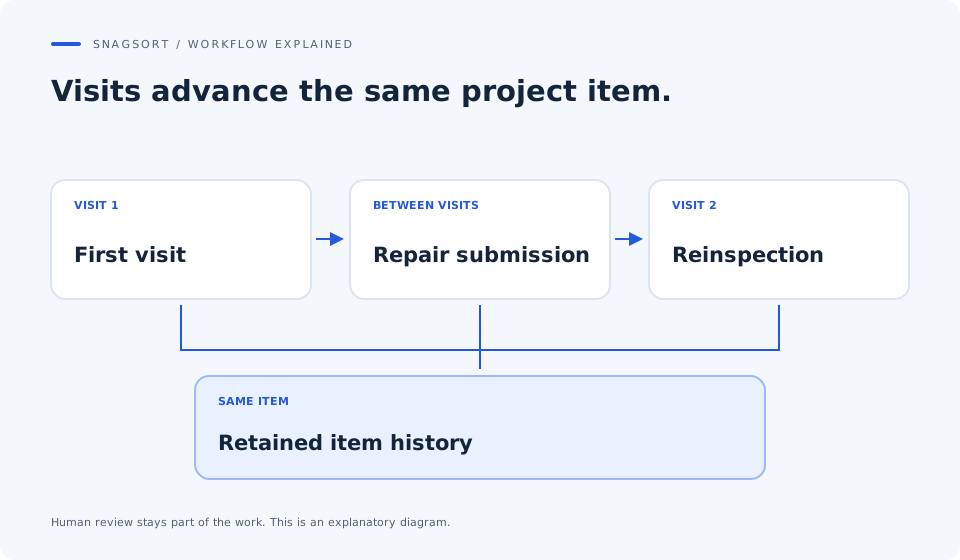
The shared project register connects the original observation, repair evidence and subsequent inspection decision. A report can describe the visit without replacing the continuing item's history.
Separate evidence roles
Original condition, work in progress and completion evidence serve different purposes. The reviewer needs to understand which photograph supports the finding and which supports a repair submission before recording acceptance.
A practical comparison
What matters between capture and closeout
Published competitor information is linked below. Match the plan, permissions and work you actually need.
| What you need | SnagSort | ArchiSnapper |
|---|---|---|
| Mobile visit work | Photo-first reviewed item capture with project context. | Mobile observations, photos, drawings and field reports. [1] |
| Project requirements | Supplied drawings/specifications support cited questions. | Drawing annotation and plan-located punch items are published. [1] |
| Contractor collaboration | Assigned-scope response and completion evidence. | Contractors can upload resolution photos and comments. [1] |
| Record/output focus | Shared project items, repeat inspection and evidence reports. | Branded field reports, punch lists and task assignment. [1] |
| Ecosystem decision | Agree practical exports; no Deltek integration is established here. | Connections with Deltek A&E products are published. [1] |
SnagSort capabilities: Project Intelligence, inspection and client workflow, contractor responses and human review of AI. Check the live product against your own project before buying.
See the work, then test it
Three visits to resolve the same finish issue
Illustrative workflow: an independent inspector revisits a wall junction. The client needs to understand the initial issue, the contractor's attempted repair and the final inspection decision.
Ground the first finding
Capture the condition, confirm its location and check the supplied finish requirement. Review the description so the report communicates the observed issue accurately.
Review the repair evidence
Open the completion submission against the same item. Distinguish it from the original and any progress photographs, and check whether the action has actually been met.
Preserve the return or acceptance
Record the reason for another repair or the authorised acceptance. Review the issued output for full comments, readable photographs and relevant drawing context.
A polished report matters. The buying test also includes how easily a competent person follows the item's evidence between visits.
Price the whole workflow
What the subscription covers
SnagSort's web plans charge for active-project capacity and include authorised participants. Review Deltek's current ArchiSnapper offer and the access your practice requires rather than rely on an old licence price. Include branding, practice integrations, contractor participation and the number of ongoing projects.
£12 / month
1 active project£39 / month
5 active projects£99 / month
20 active projectsUnlimited authorised internal users, contractors and viewers. Enterprise is by agreement. 14 days. Payment details at checkout. Monthly billing starts automatically unless cancelled. Check tax and final terms at checkout. See current plans and billing terms.
Your decision test
Bring one real project to the comparison
Use the same observations, drawings, people and output requirements in both products. Record total effort and the quality of the acceptance record.
- Use an item that appears across at least two visits.
- Check full comments and the distinction between original and completion photos.
- Ask a colleague to follow the requirement and inspection decision.
- Include report preparation and any office-side rework.
Questions your team will ask
SnagSort vs ArchiSnapper: answers
Can ArchiSnapper already create punch lists and receive contractor photos?
Yes. Deltek's current product page describes punch lists and contractor uploads of resolution photographs and comments. SnagSort's case is the combined source-aware item workflow and commercial fit.
Is SnagSort useful for an independent inspector?
It can suit repeat snagging and reinspection where the project register, supplied requirement and evidence need to stay connected. Test the report format and client handover requirements before using it as your standard output.
Does a new report have to mean a new snag?
No. An inspection visit and the permanent project item are different records. In the trial, check that revisiting an existing item advances its evidence and decision without duplicating the finding.
What should I check in the photographs?
Confirm that the original condition, work in progress and completion evidence are understandable and attached to the correct item. A photograph supports the record; it does not by itself establish that all required work has been accepted.
Can SnagSort replace our Deltek connections?
No equivalent connection is established in this comparison. If project/client data or practice systems depend on ArchiSnapper's published Deltek links, include that requirement and any transfer work in the decision.
How do I judge the better reporting workflow?
Use your actual client's required content and a representative revisit. Inspect comments, locations, references, photographs, drawing context and acceptance information. Count all preparation/correction work, not only the time to press export.
Sources and scope
This is a comparison published by SnagSort, not an independent review or endorsement. Competitor information was checked on ; features, names and prices can change. The example workflow is illustrative and no measured productivity advantage is claimed.
Competitor names belong to their respective owners. No affiliation is implied. Tell us about a correction.