

Start with the job
Make the choice around your team
Choose SnagSort when reducing drafting and evidence administration around repeat snagging visits is the priority.
Keep SnagR when configurable forms, progress tracking, site processes and tailored reporting are important to your programme, or the established project workflow is already delivering reliable records.
Review an assisted draft
A photograph and site context support a suggested description and action. The inspector checks the wording before using it. An AI suggestion must not turn a suspected condition into a confirmed contractual defect.
Follow the same item between visits
Original observation, contractor response, completion evidence and accept/return decisions stay connected to the project record. Reinspection should advance the existing item rather than create a second list with different references.
Make the next action explicit
A contractor sees assigned work; an authorised inspector reviews submitted completion. Clear role labels and the Ready for Inspection/Returned distinction help the team identify who needs to act next.
A practical comparison
What matters between capture and closeout
Published competitor information is linked below. Match the plan, permissions and work you actually need.
| What you need | SnagSort | SnagR |
|---|---|---|
| Quality workflow | Focused capture, contractor response, reinspection and reports. | Configurable defect/inspection processes and wider site workflows. [2] |
| Drawing context | Optional pins, supplied documents and source-backed project questions. | Location-based issues plotted on drawings. [1] |
| Drafting | AI-assisted descriptions/actions are reviewed by the user. | The reviewed developer listing describes structured field capture; it does not establish equivalent AI drafting. [2] |
| Evidence decisions | Completion evidence remains separate from an inspector's acceptance. | The published scope includes audit records and handover controls. [1] |
| Breadth | Prioritises the evidence-to-closeout journey. | Progress monitoring, digital forms, site journals and reports are published. [1] |
SnagSort capabilities: Project Intelligence, inspection and client workflow, contractor responses and human review of AI. Check the live product against your own project before buying.
See the work, then test it
An inspector returns to check last week's work
Illustrative workflow: a Clerk of Works finds a panel repair incomplete on a second visit. The important record is how that item moved from observation through response to the inspection decision.
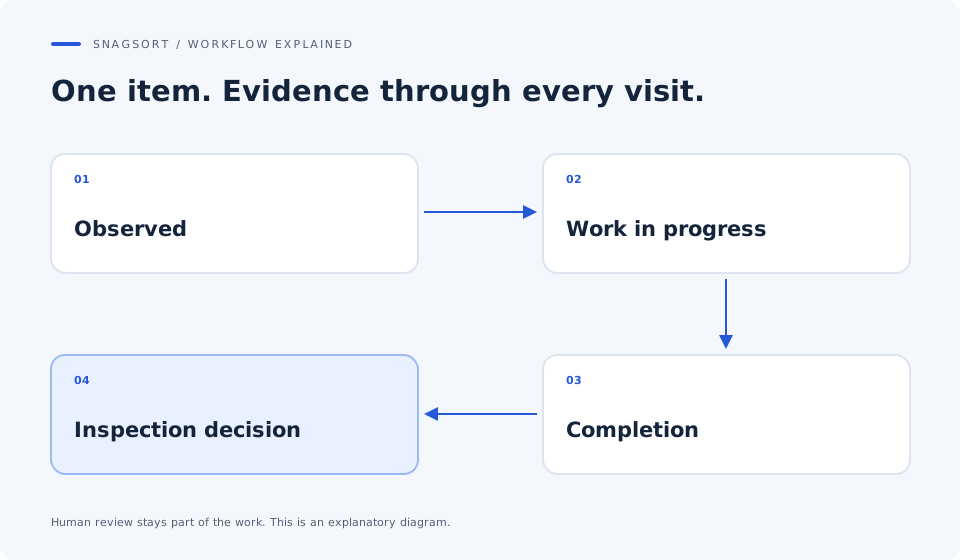
Keep the finding specific
Capture the visible issue and review the draft. Use the drawing and supplied specification where relevant. Separate observed condition, requirement and inference.
Review the contractor's evidence
Open the response against the original reference. Look at the completed work and its supporting photograph rather than treating an emailed 'done' as sign-off.
Record the actual outcome
Accept complete work or return the remaining action with an explanation. Preserve the earlier response so another authorised reviewer can follow what happened.
This scenario is a buying test, not a claim that SnagR cannot retain evidence. Compare how much work the team performs to get a clear record.
Price the whole workflow
What the subscription covers
SnagSort publishes active-project web plans starting at £12 per month with unlimited authorised participants. Ask SnagR for the service and project scope your team requires; a free app download is not a price for the whole service. Include tailored forms, setup, reporting, user permissions and support in your assessment.
£12 / month
1 active project£39 / month
5 active projects£99 / month
20 active projectsUnlimited authorised internal users, contractors and viewers. Enterprise is by agreement. 14 days. Payment details at checkout. Monthly billing starts automatically unless cancelled. Check tax and final terms at checkout. See current plans and billing terms.
Your decision test
Bring one real project to the comparison
Use the same observations, drawings, people and output requirements in both products. Record total effort and the quality of the acceptance record.
- Use at least one defect that needs a return and a second submission.
- Include description corrections before issue.
- Ask a different authorised inspector to follow the record without explanation.
- Check the full comments and relevant drawing context in the export.
Questions your team will ask
SnagSort vs SnagR: answers
Which SnagR product is this comparison about?
It concerns SnagR Software Ltd's construction and infrastructure product, identified through snagrweb.com and its developer listing. It does not compare similarly named consumer apps or the unrelated snagr.com site.
Is SnagSort's AI allowed to close a defect?
No. AI assists drafting and source discovery. The authorised inspector reviews the required evidence and records acceptance or a reason for return. Contractor submission is a separate step.
Does SnagR already support drawing pins and reports?
Yes. Its official construction page and developer listing describe drawing-located issues, professional reports and inspection records. Those features are baseline requirements, not an exclusive SnagSort advantage.
Can a reinspection use the original snag reference?
The SnagSort field lifecycle uses the shared permanent project register. Test reopening the existing item, reviewing its response and recording the inspection outcome without creating a duplicate item.
Is an auditable record a compliance certificate?
No. A traceable record supports review of the observation, evidence and project decision. The authority and meaning of acceptance depend on the project's responsibilities and required inspection.
How should a quality team compare configurable workflows?
List the forms and decisions genuinely needed for the job. Test the standard SnagSort journey first; if bespoke commissioning, progress or multi-stage controls are essential, evaluate SnagR's configured scope and avoid adding duplicate systems.
Sources and scope
This is a comparison published by SnagSort, not an independent review or endorsement. Competitor information was checked on ; features, names and prices can change. The example workflow is illustrative and no measured productivity advantage is claimed.
Competitor names belong to their respective owners. No affiliation is implied. Tell us about a correction.