

Start with the job
Make the choice around your team
Choose SnagSort when the ordinary defect lifecycle, source context and simple active-project pricing fit the project without bespoke process design.
Choose iSnag when custom record types, fields, workflows or commissioning/handover processes are essential, or the project already depends on a configured Dome environment. SnagSort is not presented as a like-for-like commissioning platform.
Use useful context without blocking capture
Start an observation with a photograph and confirmed location. Add drawings and other requirements where they help. Document processing and location suggestions should support the visit rather than become prerequisites for the first useful item.
Find the requirement as well as the room
The project drawer brings supplied drawings and specifications into source-backed questions. Finding where an item belongs and checking what is specified are different tasks; the inspector remains responsible for assessing the result.
Begin with a clear defect lifecycle
The normal sequence makes outstanding work, submitted completion, returned work and acceptance explicit. Try the standard journey before deciding the project needs additional fields or bespoke stages.
A practical comparison
What matters between capture and closeout
Published competitor information is linked below. Match the plan, permissions and work you actually need.
| What you need | SnagSort | iSnag |
|---|---|---|
| Drawing-led location | Supplied drawings, suggested locations and optional pins. | Intelligent drawings/elevations populate location metadata. [1] |
| Requirements context | Supplied specifications and documents support cited project questions. | The published scope includes linked contextual media and configurable records. [1] |
| Workflow approach | Clear ordinary defect/inspection lifecycle. | Bespoke record types, fields and statuses are published. [1] |
| Project breadth | Focus on snagging, response, verification and reports. | Area inspections, checklists, surveys and commissioning-related capture are published. [1] |
| Buying process | Published active-project web plans and trial terms. | Request the configured scope and commercial offer from Dome. [1] |
SnagSort capabilities: Project Intelligence, inspection and client workflow, contractor responses and human review of AI. Check the live product against your own project before buying.
See the work, then test it
A room needs the elevation, not just the floor plan
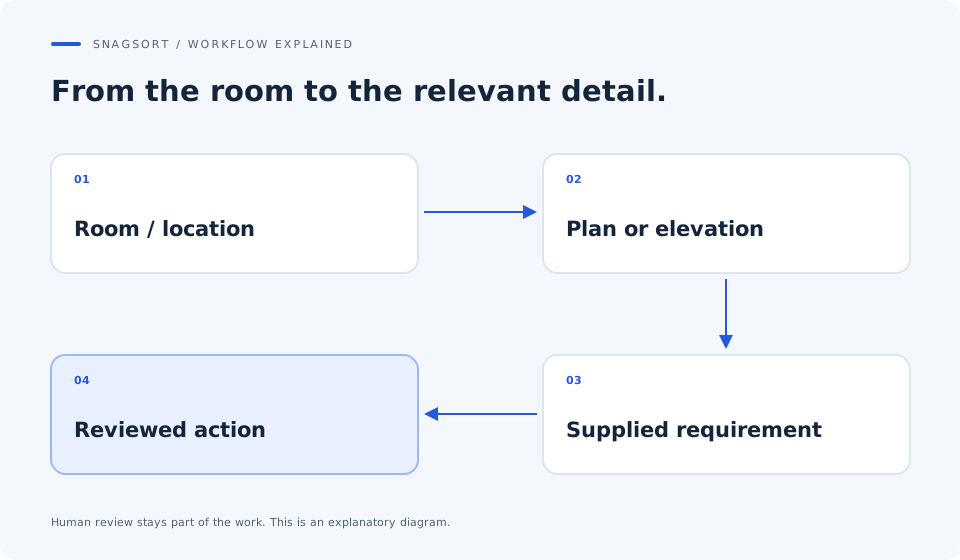
Illustrative workflow: an inspector checks a fixture against a room-specific detail. The job needs a clear location, the relevant supplied requirement and a repair record that another reviewer can follow.
Choose the useful source
Use the room/location and related drawing information to open the supplied plan, elevation or detail. Check the reference and supplied revision.
Review the finding
Photograph the observed condition and check the drafted action against the requirement. Keep missing source information visible rather than filling it with an AI assumption.
Inspect the repair
The contractor submits the relevant completion evidence. The authorised inspector accepts or returns it against the original item and source context.
The benchmark is the effort required to obtain a sound finding and close it. The existence of a drawing pin does not by itself establish superiority.
Price the whole workflow
What the subscription covers
SnagSort's current web plans buy one, five or twenty active projects at £12, £39 or £99 per month. The reviewed iSnag product page does not provide a comparable numerical service price; ask Dome for the scope your processes require. Include configuration, onboarding, support and any wider software/service package.
£12 / month
1 active project£39 / month
5 active projects£99 / month
20 active projectsUnlimited authorised internal users, contractors and viewers. Enterprise is by agreement. 14 days. Payment details at checkout. Monthly billing starts automatically unless cancelled. Check tax and final terms at checkout. See current plans and billing terms.
Your decision test
Bring one real project to the comparison
Use the same observations, drawings, people and output requirements in both products. Record total effort and the quality of the acceptance record.
- Use a room whose relevant detail is on another drawing.
- Check supplied revisions and source references.
- Count setup and drafting corrections as well as capture.
- Test whether a standard lifecycle meets the job before asking for bespoke fields.
Questions your team will ask
SnagSort vs iSnag: answers
Does iSnag already have intelligent drawing locations?
Yes. Dome's product page says drawing/elevation pins can identify and populate the relevant location metadata. SnagSort's case is the combined context, reviewed drafting and ordinary closeout journey, not exclusive location intelligence.
When is a standard defect workflow better than a bespoke one?
When it covers the real decisions without adding configuration and training. If the project needs commissioning stages, specialised record types or governed handover processes, assess those requirements rather than force them into a simpler workflow.
Can SnagSort start before drawings are uploaded?
Yes. Drawings and other project documents are optional aids to the first observation. Start with the condition and location, then use supplied context as it becomes useful.
Can project AI guarantee the correct drawing or requirement?
No. Suggestions and source-backed answers assist the person doing the work. Check the named source, page and supplied revision, especially where the finding or action depends on a specific detail.
Is SnagSort an O&M or commissioning system?
This comparison does not establish that scope. It focuses on defects, evidence and inspection. Define any O&M, asset or commissioning deliverables separately and test the agreed export boundary.
What should a handover team compare first?
Choose representative rooms and requirements, then measure setup, finding the relevant source, reviewing the draft, receiving repair evidence and recording acceptance. Confirm the output contains the information the handover recipient needs.
Sources and scope
This is a comparison published by SnagSort, not an independent review or endorsement. Competitor information was checked on ; features, names and prices can change. The example workflow is illustrative and no measured productivity advantage is claimed.
Competitor names belong to their respective owners. No affiliation is implied. Tell us about a correction.