

Start with the job
Make the choice around your team
Choose SnagSort when reviewed capture, supplied project context and a clear remaining-work queue are the centre of your job.
Choose PlanRadar when you need its wider configurable ticket processes, statistics and reporting formats, or your organisation has already standardised those workflows. Free subcontractor participation means the decision cannot rest on that feature alone.
Work from the observation
Photographs and a short site note lead into a reviewed description and action. Supplied drawings and specifications can add context. The user does not need to turn the inspection into a document-management project before recording useful work.
Separate repair from acceptance
Outstanding, In Progress, Ready for Inspection, Returned and Closed describe who needs to act next. The inspector's recorded decision preserves a reason for return and the evidence used for acceptance.
Price the live work
Pro, Team and Business increase active-project capacity rather than adding paid internal seats. The same project's team can contribute within their permissions. Compare this with the specific PlanRadar plan and user mix you would buy.
A practical comparison
What matters between capture and closeout
Published competitor information is linked below. Match the plan, permissions and work you actually need.
| What you need | SnagSort | PlanRadar |
|---|---|---|
| Starting point | Photo-first reviewed snag; documents remain optional. | Mobile snag creation with photos, video, voice and plan context. [1] |
| Contractor participation | Free authorised respondents within assigned scope. | Subcontractors can update snags for free. [1] |
| Location | Saved location and optional drawing context. | Pins on plans and BIM models. [1] |
| Output | Reports and exports from the project record. | Configurable report templates and contractor/type filtering. [1] |
| Commercial comparison | Paid active-project capacity, unlimited authorised participants. | Check the selected paid-user plan and billing conditions. [2] |
SnagSort capabilities: Project Intelligence, inspection and client workflow, contractor responses and human review of AI. Check the live product against your own project before buying.
See the work, then test it
A handover list where 'done' still needs checking
Illustrative workflow: a PM receives completion photos from two trades but cannot tell which work has been inspected. The aim is to make the next action clear for each item.
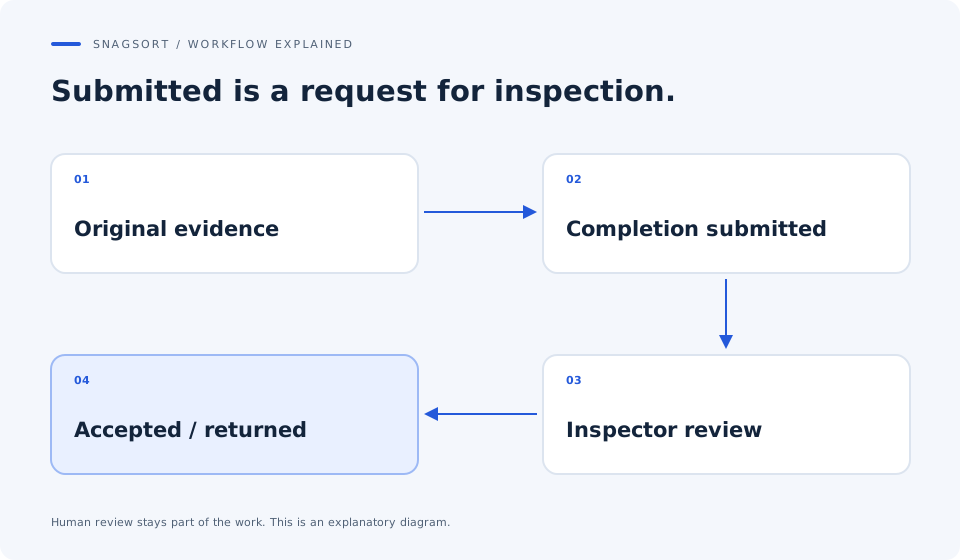
Create a precise action
Record an incomplete wall finish with its photograph and location. Review the description and check the supplied requirement if it matters to the finding.
Ask for completion evidence
The responsible contractor adds the repair photograph against the assigned item. Submission places the work ready for inspection; it does not silently turn a claim into acceptance.
Accept or return
The authorised inspector checks the work and evidence. If a junction remains unfinished, return it with the reason so the contractor understands the remaining action.
A smaller outstanding list is useful only when the accepted items have a traceable decision. Test this directly in the trial.
Price the whole workflow
What the subscription covers
SnagSort's current web plans are £12, £39 and £99 per month for one, five and twenty active projects. PlanRadar's pricing page sets out its own paid-user plans and participation terms. Compare your internal user mix, required report/template features, billing cycle and onboarding cost. A free subcontractor response does not make the two paid products identical.
£12 / month
1 active project£39 / month
5 active projects£99 / month
20 active projectsUnlimited authorised internal users, contractors and viewers. Enterprise is by agreement. 14 days. Payment details at checkout. Monthly billing starts automatically unless cancelled. Check tax and final terms at checkout. See current plans and billing terms.
Your decision test
Bring one real project to the comparison
Use the same observations, drawings, people and output requirements in both products. Record total effort and the quality of the acceptance record.
- Include a returned item and a second repair attempt.
- Check that each trade receives only the scope it should act on.
- Compare report preparation as well as field capture.
- Count the PM's work needed to explain statuses and chase missing evidence.
Questions your team will ask
SnagSort vs PlanRadar: answers
Why consider SnagSort instead of PlanRadar?
Consider it when the defect-to-inspection journey is your main problem and project-based participation fits your team. Use a live workflow to establish whether its capture, source context and closeout steps reduce administration for you.
Does PlanRadar charge subcontractors to update snags?
Its official UK snagging page says subcontractors can update snags for free. SnagSort should be assessed on workflow and the full commercial package rather than pretending free external response is unique.
What is the difference between Ready for Inspection and Closed?
Ready for Inspection records submitted completion for review. Closed records an authorised inspector's acceptance with the supporting record. If more work or evidence is needed, the item is returned with a reason.
Can I record additional work and queries as well as defects?
SnagSort keeps defects, additional work and queries distinct. Review the type and responsibility so a question or potential change is not presented as an accepted defect or authorised extra work.
Does SnagSort have to replace all our PlanRadar processes?
No company-wide replacement is implied by this comparison. First identify the specific snagging job, required exports and who owns the authoritative record. A second tool is useful only if it avoids duplicate administration.
What should I see in a closeout report?
Check the item reference, observed condition, location, responsible party, relevant comments, completion evidence and inspection outcome. Where drawing context matters, confirm it is readable in the issued output you intend to use.
Sources and scope
This is a comparison published by SnagSort, not an independent review or endorsement. Competitor information was checked on ; features, names and prices can change. The example workflow is illustrative and no measured productivity advantage is claimed.
Competitor names belong to their respective owners. No affiliation is implied. Tell us about a correction.